Golden Corn Green Watercolor Backgrounds: A Designer's Guide
The Essence of Harvest and Growth in Digital Paper
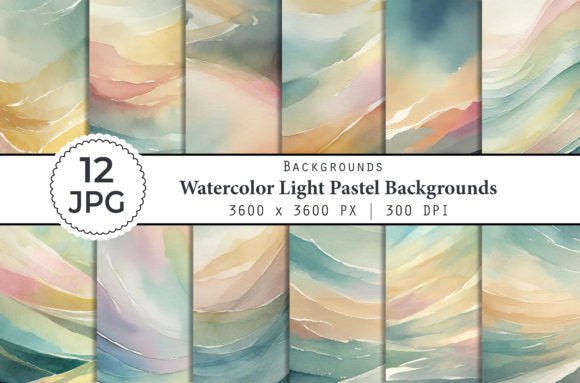
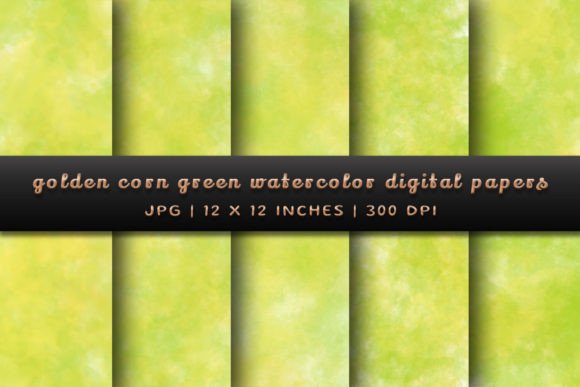
When you first encounter the Golden Corn Green Watercolor Backgrounds, you’re not just seeing a digital file; you’re feeling a specific mood. This collection blends the warmth of a late summer harvest with the fresh vitality of spring foliage. The "Golden Corn" aspect isn't a harsh, bright yellow. Instead, it mimics the soft, textured look of dried corn husks or sun-bleached wheat fields—think warm beige, muted amber, and soft ochre. This is paired with "Green" watercolor strokes that range from sage to olive, grounding the design with an organic, earthy stability.
What makes this combination work so well is the watercolor medium itself. Unlike flat digital colors, these backgrounds have texture. They have "tooth." You can see the bleed of the pigment, the subtle variations in opacity, and the way the colors blend at the edges. This gives your designs an immediate handmade, artisanal quality. It feels human. In a digital landscape often dominated by sleek, cold gradients, these backgrounds offer a breath of fresh air—literally and figuratively. They are perfect for projects that need to feel grounded, authentic, and connected to nature without being overly rustic or unsophisticated.
Practical Applications: Where These Backgrounds Shine
The versatility of Golden Corn Green Watercolor Backgrounds is one of its strongest assets. Because the color palette is neutral enough to be timeless but distinct enough to be memorable, it fits into a wide array of projects. If you are a small business owner or an entrepreneur, think about your product packaging. A skincare line, a local honey brand, or a specialty tea company would find these backgrounds invaluable. They communicate "natural ingredients" and "small-batch quality" instantly, without a single word of text.
For content creators and bloggers, these digital papers solve the perpetual problem of finding unique stock imagery. Use them as a base for quote graphics on Instagram or Pinterest. The texture provides visual interest that stops the scroll, while the soft palette ensures that your text—whether it’s a serif font for elegance or a script font for personality—remains legible. In editorial design, these backgrounds can set the stage for lifestyle magazines, wellness newsletters, or wedding invitations. They act as a canvas that supports the content rather than competing with it.
Even in web design, where clarity is king, these papers have a place. They work beautifully for "About Us" pages where you want to tell a story, or as subtle header images that fade into a white content area. The key is to use them where you want to evoke a feeling of warmth and approachability. They are particularly effective for seasonal campaigns—think autumn launches or spring refreshes—bridging the gap between the two seasons with their unique color blend.
Enhancing Brand Identity and Visual Hierarchy
Choosing the right design assets is a strategic decision that directly influences brand perception. When you incorporate Golden Corn Green Watercolor Backgrounds into your brand identity, you are signaling a specific set of values. You are telling your audience that you value craftsmanship, organic beauty, and a relaxed sophistication. This is crucial for industries like wellness, eco-fashion, artisanal food, and lifestyle coaching. It moves a brand away from looking corporate and sterile toward feeling approachable and trustworthy.
From a technical design perspective, these backgrounds allow for strong visual hierarchy. Because the textures are soft and the colors are muted, they provide excellent contrast potential for typography. You can place a bold, dark charcoal headline over the golden-green wash, and it will pop. This makes them a fantastic tool for logo design presentations or mockups. Instead of placing a logo on a stark white background, placing it on a textured watercolor paper instantly elevates the perceived value of the design. It frames the work as premium and considered.
Furthermore, consistency is key in branding. Having a set of five coordinating papers means you can maintain a cohesive look across different platforms. You might use the darker, more green-heavy paper for your website background, and the lighter, golden-toned paper for your business cards. This creates a unified visual language that helps with brand recognition. It ensures that whether a customer sees you on social media graphics or holds a physical brochure in their hands, the feeling remains the same.
Technical Specifications and Usage Tips
Understanding the technical side of these assets ensures you get the best results. The Golden Corn Green Watercolor Backgrounds come as high-resolution files—specifically 12x12 inches at 300 DPI. This is a critical detail for anyone working in print. 300 DPI (dots per inch) is the standard for professional printing, ensuring that the watercolor textures look crisp and not pixelated, even when printed on large formats like posters or canvas wraps.
The files are provided as High-Quality JPGs. JPGs are excellent for photographs and complex textures like watercolor because they handle the subtle gradations of color efficiently. However, remember that JPGs are "flattened" images. This means you cannot edit the watercolor strokes themselves in software like Photoshop (you can't move a paint splatter from the left side to the right side). Instead, you treat them as a complete background layer. If you need to add text or overlay other graphics, you would place your text on a layer above the background.
For those working in sublimation or print-on-demand, the 12x12 inch square format is versatile. It fits perfectly for scrapbooking elements, card making, or square social media posts. If you need a different aspect ratio, such as a vertical A4 document or a horizontal banner, you can easily crop the background. Because watercolor is abstract, cropping rarely ruins the composition; it just reveals a different section of the texture. Just ensure you don't stretch the image disproportionately, as that can distort the texture and make it look artificial.
Choosing and Pairing Your Typography
A background is only half the equation; the text you place on top of it makes or breaks the design. When working with a textured, organic background like the Golden Corn Green Watercolor collection, your font choice needs to be deliberate. Avoid using handwritten fonts or overly complex script fonts for long paragraphs. While they look charming, the texture of the background combined with the loops of a script font can create a visual mess that is hard to read.
Instead, focus on font pairing. A great strategy is to use a clean, modern sans serif font for body text. Fonts like Montserrat, Lato, or Open Sans have simple geometry that stands up well against the organic chaos of watercolor. For headlines, you can afford to be more expressive. A sturdy serif font like Playfair Display or a condensed sans serif can create a beautiful contrast. The structure of the letters provides an anchor, allowing the watercolor to be the "art" while the typography provides the "information."
When setting up your design, consider readability first. If the background is particularly busy or dark in one area, try placing a semi-transparent white shape (a "knockout" or text box) behind your text. This creates a clean pocket of legibility while allowing the beautiful golden and green tones to peek around the edges. This technique is especially useful in packaging design